Annapurna Yojana Online Application Link is now officially active on the West Bengal government portal. If you’re a woman aged 25–60 from West Bengal, you can apply for Rs 3,000 monthly financial assistance through the annapurna bhandar online apply 2026 process. This guide walks you through every step of filling the form, whether online or offline, and answers all your key questions.
Summary Table
| Detail | Information |
|---|---|
| Scheme Name | Annapurna Yojana (Annapurna Bhandar Scheme) |
| Online Link Activation Date | June 1, 2026 |
| Monthly Benefit | Rs 3,000 via Direct Benefit Transfer |
| Application Deadline | Open for 90 days from June 1, 2026 (approx. August 25, 2026) |
| Official Website | socialsecurity.wb.gov.in |
| Application Mode | Online + Offline available |
| Online Status | Link Activated & Application Window Open |
What is Annapurna Yojana?
Annapurna Yojana (formerly called Annapurna Bhandar) is West Bengal’s new social security scheme replacing Lakshmir Bhandar from June 1, 2026. Eligible women receive Rs 3,000 per month (double the previous Rs 1,500–1,700 under Lakshmir Bhandar) directly into their Aadhaar-linked bank accounts via DBT.
All existing Lakshmir Bhandar beneficiaries will be automatically migrated to Annapurna Scheme but you have to fill the application form for verification.
How to Fill Annapurna Yojana Form Online: Step-by-Step
Follow these exact steps to complete your annapurna yojana online registration on the official website:
Step 1: Visit the Official Portal
Go to socialsecurity.wb.gov.in (the annapurna yojana portal link) on your phone or computer. Bookmark this annapurna yojana apply online official website for future use.
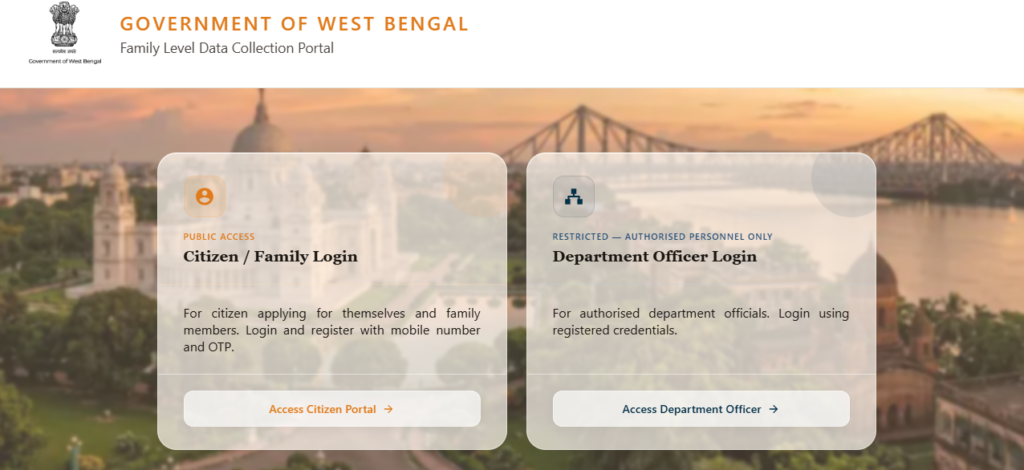
Step 2: Accessing the Citizen Portal
- Go to the “Public Access Citizen / Family Login” section
- Click on the Access Citizen Portal
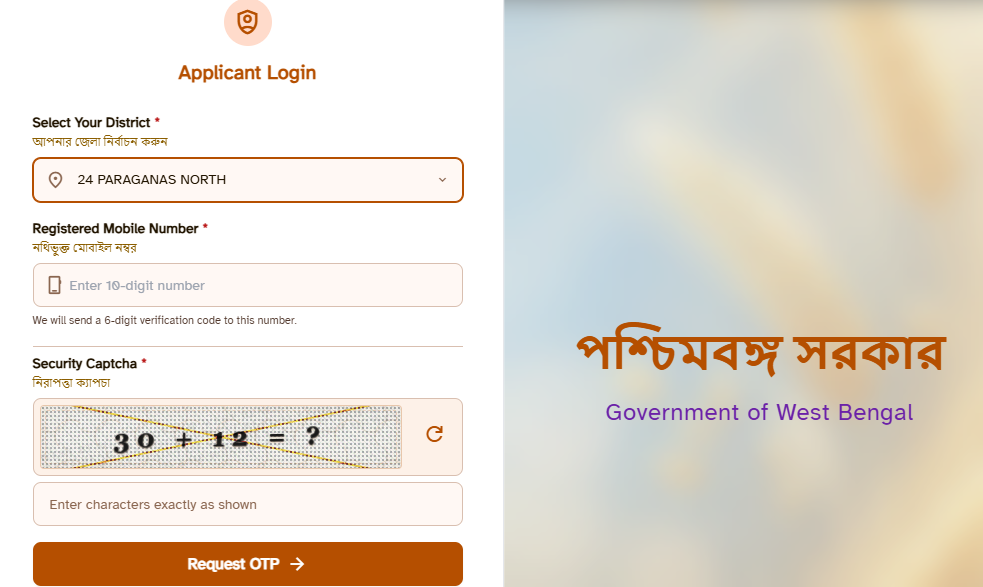
Step 3: Register with Your Mobile Number
- Select your District and Enter your active mobile number (must be Aadhaar-linked)
- Click “Get OTP” and enter the one-time password sent to your phone
- Complete the captcha and click “Submit”
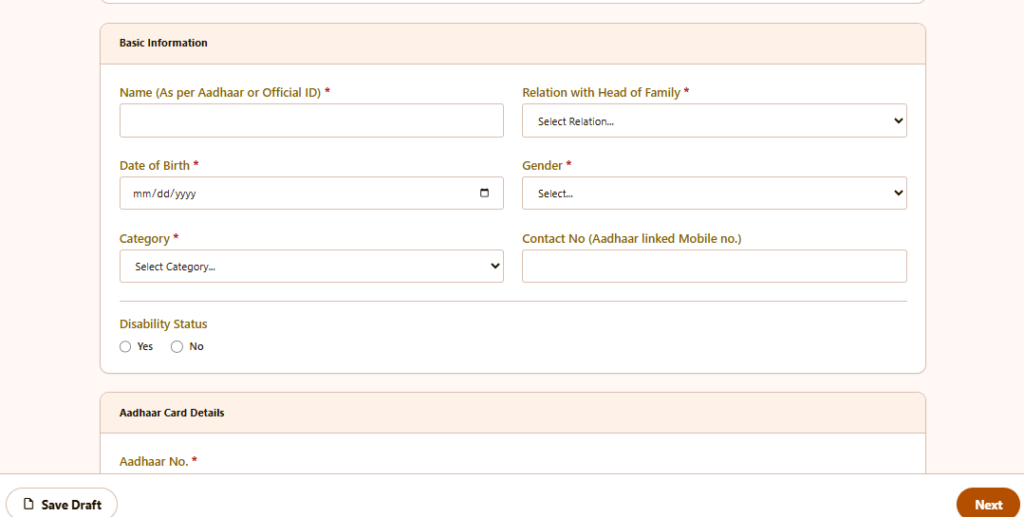
Step 4: Basic Information
Here 1st fillup the Enter Basic Information, Aadhaar Card Details, Family Demographics & Address, Voter Card Details of Head of the family. You can add one by one the infomation all members of your household premises.
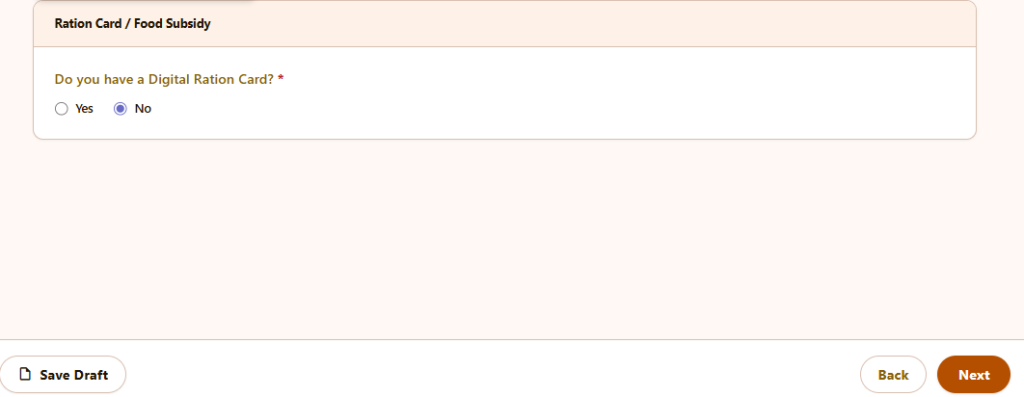
Step 5: Enter Ration Card Details
- If you have Digital Ration Card then select Yes and choose type: AAY, PHH, SPHH, RKSY1, RKSY2 , Non-subsidized and enter Ration Card N
- Choose No if you don’t have and select next
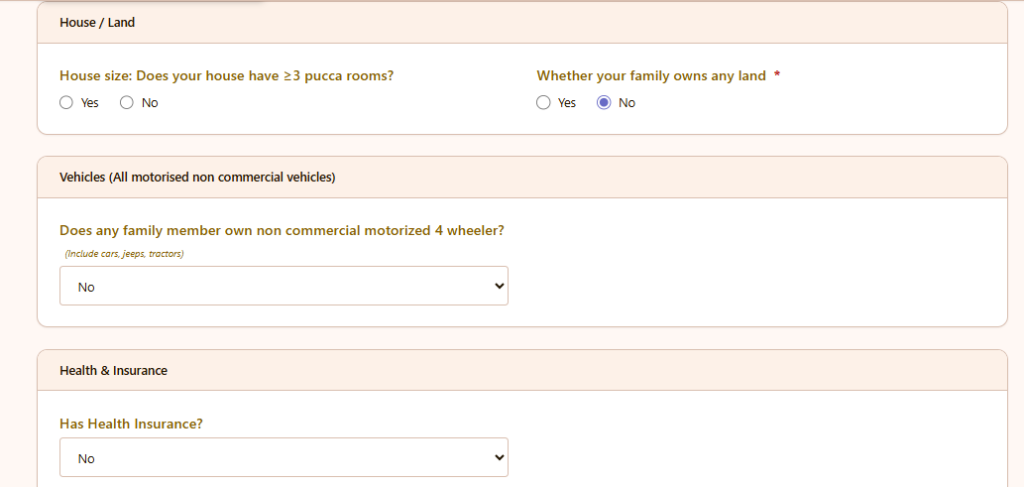
Step 6: Declare Assets Details
You must disclose: House / Land section, Vehicles (All motorised non commercial vehicles) section, Health & Insurance section and select next.
Note: * marks are medatory, and for other questions if you have doubt you can skip them.
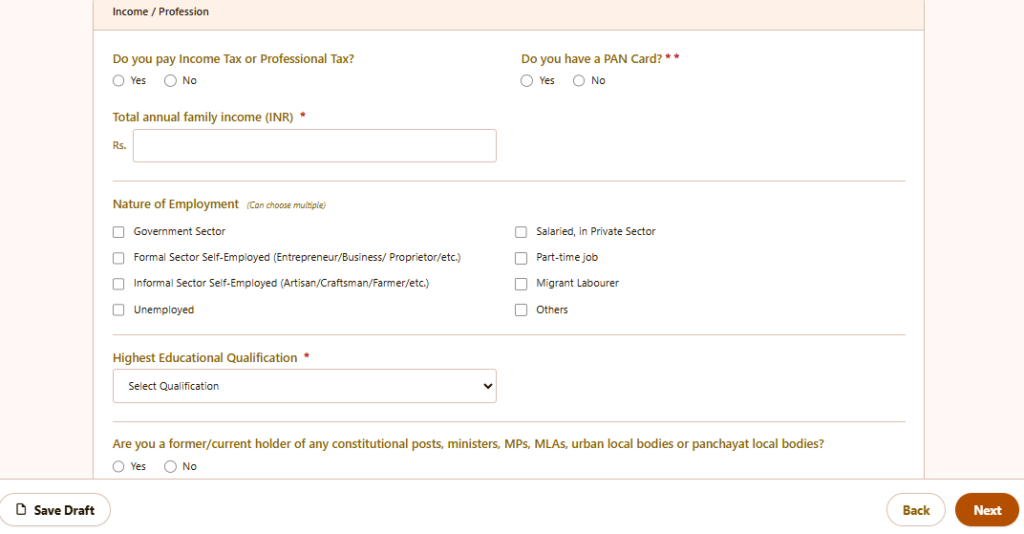
Step 7: Income / Profession
Answer this section very carefully. This section contains some mendatory section like PAN Card no., Total annual family income (INR), Highest Educational Qualification etc.
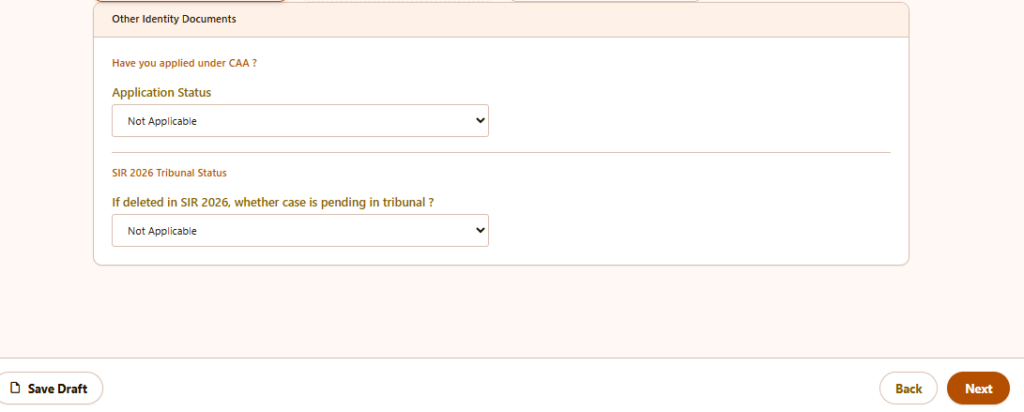
Step 8: Identity Documents
This part contains about CAA and SIR 2026 Tribunal Status.
Step 9: Government Pension & Schemes
Here you need to disclose the Receiving Government Scheme Benefits (via DBT)?

Step 10: Add a Member Section
Here you need to add member of your house one by one.
Step 12: How to Fill the Family Data Collection Form – DBT Section
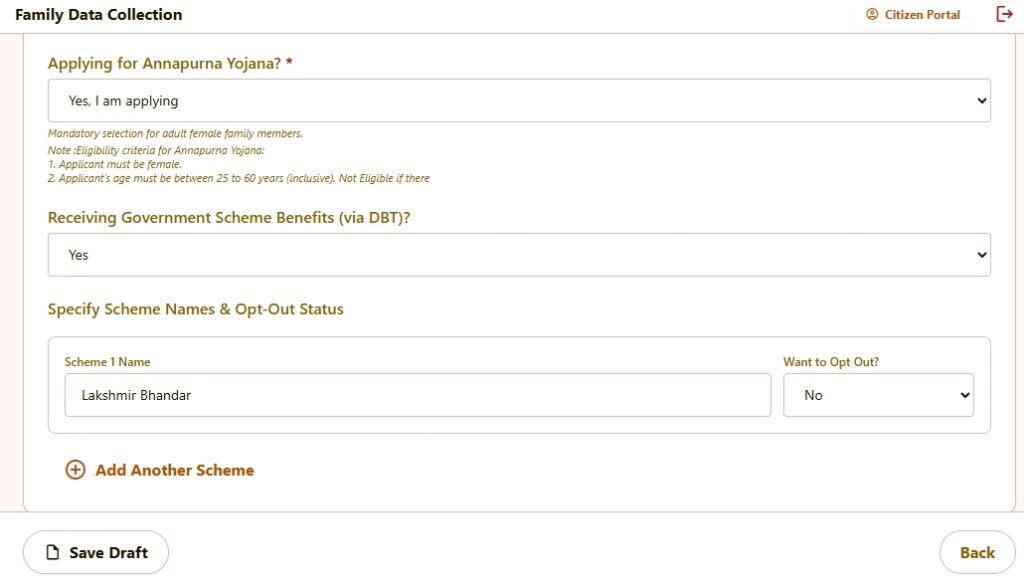
This part of the form records two things: whether a female family member is applying for Annapurna Yojana, and whether anyone in the family already receives money through a government scheme via DBT (Direct Benefit Transfer). Both sections are straightforward once you know what each question is actually asking.
1. Decide on Annapurna Yojana
The first question asks: Applying for Annapurna Yojana?
This question appears for adult female family members only. Before answering, check two things:
- The person must be female.
- Her age must be between 25 and 60 years (both 25 and 60 are included).
If both conditions are met, select “Yes, I am applying” from the dropdown.
If the person does not meet either condition – for example, her age is 22, or the family member is male – select No. The field is mandatory for adult female entries, so you cannot leave it blank.
2. Answer the DBT Question
The second question asks: Receiving Government Scheme Benefits (via DBT)?
DBT means the government sends money directly to the beneficiary’s bank account. If any family member is currently receiving payments this way — under any scheme — select Yes.
If no one in the family receives DBT payments at the moment, select No and skip ahead to saving.
3. Fill Scheme Details (Only If You Answered Yes)
Once you select Yes in Step 2, a new section opens: Specify Scheme Names & Opt-Out Status.
Here you will see a row with two fields:
Scheme Name – Type the exact name of the scheme. For example: Lakshmir Bhandar, Kanyashree, Swasthya Sathi, etc.
Want to Opt Out? – This dropdown has two options:
- Select No if the person wants to keep receiving benefits from that scheme. This is the default and the most common selection.
- Select Yes if the person wants to voluntarily stop receiving benefits from that scheme. This action is recorded and will affect future payments.
4. Add More Schemes If Needed
If a family member receives benefits under more than one scheme, click + Add Another Scheme. A new row appears with the same two fields. Fill in the next scheme name and its opt-out status.
Repeat this for every scheme that applies. There is no fixed limit on how many you can add.
5. Save or Go Back
Once all fields are filled:
- Click Save Draft to store your entries without submitting. Useful if you are filling the form across multiple sittings or for multiple family members.
- Click Back if you need to correct something on the previous page. Your entries on this page are not deleted when you go back.
Quick Reference
| Situation | What to do |
|---|---|
| Female family member, age 25–60 | Select “Yes, I am applying” for Annapurna Yojana |
| Female family member, age below 25 or above 60 | Select “No” – not eligible |
| Family receives DBT payments | Select “Yes” and list each scheme |
| Family does not receive any DBT payments | Select “No” – scheme section stays hidden |
| Want to continue a scheme | Set “Want to Opt Out?” to No |
| Want to stop a scheme | Set “Want to Opt Out?” to Yes |
| Multiple schemes | Use “+ Add Another Scheme” for each one |
Step 11: Cross-Check and Submit
- Review all details carefully for accuracy
- Ensure names match exactly between Aadhaar, bank, and form (mismatches cause DBT failure)
- Check Aadhaar linked Mobile no. carefully.
- Click Submit from the declaration & consent section and save your Annapurna Yojana application reference number
- Take a screenshot or print the acknowledgement receipt [official notice]
Validation Check Filled:
If any essential section you skipped, then Annapurna Yojana online form shows you a error like that.
- Head of Family: Name is required.
- Head of Family: Date of Birth is required.
- Head of Family: Gender is required.
- Head of Family: Social Category is required.
- Head of Family: Contact number is required and must be 10 digits.
- Head of Family: Aadhaar number is required.
- Head of Family: Aadhaar document must be uploaded.
- Basic Info: Permanent Address is required.
- Basic Info: Area Type is required.
Upload Required Documents
Scan and upload clear copies of:
Upload in the prescribed format and size 20-200kb.
| Document | Purpose |
|---|---|
| Aadhaar Card | Identity + bank linkage verification |
| Voter ID | Residence proof |
Can I Apply for Annapurna Yojana Offline?
Yes, you can apply offline. The government has released the Annapurna Yojana form PDF 2026 for both online and offline submission during the 90-day enrollment drive.
Offline Application Process:
- Download or collect the form from the official portal or local government office
- Fill it manually with all required details
- Attach photocopies of documents (Aadhaar, Voter ID, bank passbook, photo)
- Submit at designated centers:
- Public welfare camps (June 15, 16, 17, 2026) [official notice]
- Gram Panchayat offices
- Municipal offices
- Social welfare centers
Block‑by‑Block Explanation of the Annapurna Yojana Form:
| Block on Form | What It Asks | How to Fill It Correctly |
|---|---|---|
| Family Head Details | Name, Aadhaar, Mobile, EPIC (Voter ID) number of the self‑declared head of the family. | The head must be a woman aged 25–60. Copy the exact spelling from Aadhaar. No initials after the surname if Aadhaar has none. |
| Permanent Address | House No., Street, Post Office, Police Station, District, PIN. | Must match your Voter ID address. If you shifted recently and EPIC isn’t updated, get it corrected first. |
| Family Composition | List of all family members residing together and eating from the same kitchen. Includes name, relationship, age, Aadhaar, occupation. | Do not omit married daughters who have moved out. Mention “Not applicable” if a member doesn’t have Aadhaar, but every adult must ideally have one. |
| Asset Disclosure | Land holding (agricultural & non‑agricultural), non‑commercial four‑wheeler vehicle. | Check your land records (Patta/Khatian). If you own a car that isn’t a commercial taxi, you must declare it. Non‑disclosure is grounds for disqualification and recovery. |
| Bank Account Information | Account holder’s name, account number, IFSC, branch name. | The account must be single‑holder, in the applicant’s name, and Aadhaar‑seeded. Dormant or joint “either or survivor” accounts will fail DBT. |
| Income / Employment Status | Whether the woman or any family member is a regular government employee, pensioner, or income‑tax payer. | Tick ‘Yes’ if any permanent government salary/pension is drawn. Even if you’re the only woman applicant, a husband’s government pension doesn’t automatically bar you unless you are the government employee. But if you are a taxpayer, you’re out. Read the exclusion rule carefully. |
| Lakshmir Bhandar Beneficiary Details | Previous scheme ID, if applicable. | If you were a Lakshmir Bhandar beneficiary, fill this so the system can auto‑migrate you. Leave blank otherwise. |
| Self‑Declaration & Signature | A statement that all information is true, and you understand that false information leads to penal action. | Sign with a black ballpoint pen within the box. Do not let the signature touch the borders. Thumb impression is accepted only if you cannot sign. Get it attested by a gazetted officer in that case. |
If you cannot fill the online form, don’t worry — help is available at these offline camps [official notice].
What Benefits Does Annapurna Yojana Provide?
| Benefit | Detail |
|---|---|
| Monthly Financial Assistance | Rs 3,000 per month |
| Transfer Method | Direct Benefit Transfer (DBT) to Aadhaar-linked bank account |
| Duration | Ongoing (monthly credits from June 1, 2026) |
| Previous Scheme Comparison | Double the amount vs. Lakshmir Bhandar (Rs 1,500–1,700) |
| Automatic Migration | Existing Lakshmir Bhandar beneficiaries migrate automatically |
The scheme aims to empower women heads of families and support daily household needs through guaranteed monthly income.
Who is Eligible for Annapurna Yojana?
✅ Eligibility Criteria:
| Criteria | Requirement |
|---|---|
| Gender | Woman |
| Age | 25–60 years |
| Residency | Permanent resident of West Bengal |
| Bank Account | Aadhaar-linked active savings account |
❌ Exclusion Rules (NOT Eligible):
| Exclusion | Reason |
|---|---|
| Permanent government employees | Receiving regular salary/pension |
| Income taxpayers | Not eligible per government rules |
| Deceased beneficiaries | Will be excluded during verification [official notice] |
| Shifted residents | Excluded if ASDD (absentee elector) case [official notice] |
How Long Does It Take to Process the Application?
The official timeline isn’t explicitly stated in public notices, but based on the process:
| Stage | Expected Time |
|---|---|
| Application Submission | Immediate (online) or 1–3 days (offline) |
| Verification | 7–15 days (typical for DBT schemes) |
| First Payment | From June 1, 2026 for approved applicants |
| Monthly Credits | Credited regularly after approval |
Track your application: Log in to the annapurna yojana verification official website (socialsecurity.wb.gov.in), select “Track Applicant Status”, and enter your Application ID or registered mobile number [official notice].
Who Can I Contact for Help with Annapurna Yojana Application?
Online Support:
| Issue | Solution |
|---|---|
| OTP/Registration problems | Use “Resend OTP” or “Forgot Password” on portal [official notice] |
| Portal not loading | Clear browser cache, try Chrome/Firefox, apply during off-peak hours (early morning/late night) [official notice] |
| Aadhaar/Bank mismatch | Update records at bank or Aadhaar enrollment center; ensure exact name match [official notice] |
| Grievance Redressal | Check official portal for helpline numbers and email support [official notice] |
Offline Help:
- Public Welfare Camps: June 15, 16, 17, 2026 (across West Bengal) [official notice]
- Local Offices: Visit Gram Panchayat, municipal offices, or social welfare centers [official notice]
- Carry: Original documents + photocopies for assistance [official notice]
Help Channels:
Portal helpdesk, District Social Welfare Office, Panchayat, e‑Districts helpline 1800‑345‑3570
Important Instructions (Official Notice)
Mandatory Documents Checklist:
- Aadhaar Card
- Voter ID (residence proof)
- Active bank passbook (Aadhaar-linked)
- Passport-size photograph
Key Rules to Remember:
- Age verification: Must be 25–60 years at application time [official notice]
- Asset disclosure: Declare land holdings and non-commercial four-wheeler ownership [official notice]
- Name matching: Aadhaar name must match bank account exactly to avoid DBT failure [official notice]
- Verification consequences: ASDD cases (deceased/shifted/absentee) will be excluded [official notice]
Common Mistakes to Avoid
| Mistake | Consequence | Prevention |
|---|---|---|
| Incorrect Aadhaar-bank name mismatch | DBT transfer fails | Double-check exact spelling match [official notice] |
| Waiting until deadline | Server congestion, slow loading | Apply early (June 1–30 recommended) [official notice] |
| Unclear document scans | Application rejection | Use scanner app for legible, properly cropped images |
| Missing asset declaration | Disqualification | Declare all assets honestly in the form [official notice] |
Search List Summary (For Quick Reference)
If you’re searching for these terms, here’s what you need:
| Search Query | What It Means |
|---|---|
| Annapurna Yojana Online Application Link | Live portal: socialsecurity.wb.gov.in |
| annapurna bhandar online apply 2026 | Registration opened June 1, 2026 |
| annapurna yojana online registration official website | socialsecurity.wb.gov.in |
| annapurna bhandar online portal | Same as above; login required |
| annapurna yojana verification official website | Track status at socialsecurity.wb.gov.in [official notice] |
| annapurna bhandar apply online date | June 1–August 25, 2026 (90 days) |
| annapurna yojana link online | Direct link: socialsecurity.wb.gov.in/ |
| annapurna bhandar online apply purba bardhaman | Direct link: socialsecurity.wb.gov.in/ |
| annapurna yojana verification online official website purba bardhaman | Direct link: socialsecurity.wb.gov.in/ |
Annapurna Yojana Online Application Link Apply
Last Updated: June 4, 2026
Source: Women and Child Development and Social Welfare Department, Government of West Bengal [official notice]
- Online Application Portal (Direct Link): https://socialregistry.wb.gov.in/
- Official Website: https://wb.gov.in/
Final Urgent Reminder
Don’t wait until the last week of August 2026. State servers get heavy traffic near deadlines, causing slow loading and errors. Apply now (ideally in June 2026) to:
- Avoid server congestion
- Get time to fix document issues
- Secure your Rs 3,000 monthly benefit from the start [official notice]
Verify all details on the official portal — socialsecurity.wb.gov.in is the final authority for Annapurna Yojana information [official notice].
Frequently Asked Questions
Is the Annapurna Yojana online application link really activated?
Yes. The link was officially activated on June 1, 2026.
What is the last date to apply for Annapurna Yojana 2026?
You can apply for the next 90 days starting June 1, 2026.
What is the official Annapurna Yojana website to apply?
The official portal is socialsecurity.wb.gov.in.
How to check my Annapurna Bhandar application status?
Log in to the Social Security Portal and select “Track Applicant Status” using your Application ID or registered mobile number.
What are the main eligibility documents for the Annapurna scheme?
You need your Aadhaar Card, Voter ID, active bank passbook and a passport-size photo.
I was a Lakshmir Bhandar beneficiary. Do I need to reapply?
No. All existing eligible Lakshmir Bhandar beneficiaries will be automatically migrated to Annapurna Yojana.


